originally posted on 4/10/2019
ACE will be consolidating some fields soon and is asking every member to take a moment to review their online profile. To view your online profile, please sign in to aceonline.org. The first page you see should be your membership profile. If it is not, then click on the menu item Membership->Manage my profile. Once there, select “edit bio.”
Look at how your name is listed, particularly if you list a full middle name. Although the database asked for your middle name when you created your profile, that information is not necessary. If it is listed, it will be printed on your membership card. If you don't want your middle name on your membership card, change the middle name field to just your middle initial.
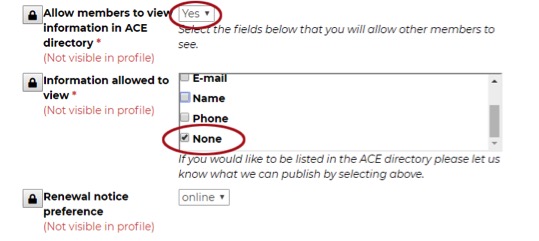
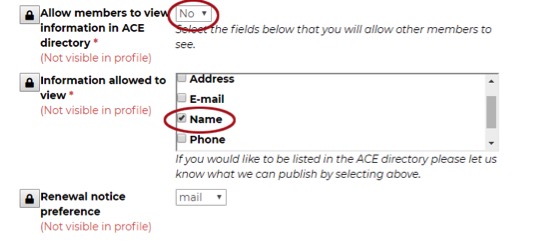
We ask that you also look over the information that you currently allow other members to view. There are several profiles where the information conflicts. If you have selected "Yes" for "Allow members to view information in ACE directory," but then selected "None" for the information allowed to be viewed, then there is a conflict. Conversely, if you have selected "No" for "Allow members to view information in ACE Directory," but then have fields listed to view, that is also a conflict. ACE will be consolidating these fields soon, so the information needs to be accurate. Please refer to the examples below.
Keep in mind that this information is only available to other registered ACE members who have signed in to the website. This information is never shared with any other organization. We would prefer not have any anonymous members, so please consider — at the very least — allowing your name to be viewed by other members.
In the first example we see this member has selected “Yes” to Allow members to view information in the ACE directory, but then selected “None” for the fields allowed to view. That is a conflict. If “Yes” is selected, then this member needs to decide which fields should be allowed.
In the second example we see this member has selected “No” for the item Allow members to view information in the ACE directory, but then has checked one of the fields as permitted to be viewed. If there are fields checked, then this should be changed to “Yes.” Or, if this member wishes to keep the answer as “No,” the only checked field should be “None.” There are five fields but only four are visible at a time, so users will need to scroll down.
This information is only available to other registered ACE members who have signed in to the website. This information is never shared with any other organization. We would prefer to not have any anonymous members, so please consider allowing your name to be viewed by other members.
@#$%&!
#ACENews